
During my first year working in IT I have learned quite a bit. Some things were very simple but have made a world of difference in my workflows, understanding, and efficiency.
They are as follows:
- Understand the end users point of view.
- Slow down when describing things to non computer savvy people.
- Learn your shortcuts/hotkeys.
- Make sure to gain a solid grasp of the fundamentals.
- Be humble.
Okay, these may seem simple but let me explain…
Understand the end users point of view
Working in Information Technology we are used to running into problems all of the time and because of this we have the confidence and understanding that there will be a solution to the problems we face(usually), we just have to find it. On the other hand, for our users, having an issue with technology no matter how small it is, can be daunting. They may feel extremely stressed out and afraid of the consequences if their issue is not resolved. We often get the receiving end of this. It is important though to remember that our jobs are more than just working on computers. We are there to serve our users, and sometimes that means being their therapist/friend. This may sound silly but for me to do my job effectively I often have to slow down the person I’m helping in order to get the information required to fix the problem. The bottom line is to be empathetic and consider how the person you are helping is feeling in that moment. If they lash out at you don’t take it personally, they are probably just very upset.
Slow down when describing things to non computer savvy people
I feel that this should be pretty self explanatory, although in the beginning I struggled with this quite a bit. We in IT are trained to know all of the different names and acronyms used in the field(and there are a LOT), but our users on the other hand are usually not. During my first few months working as help desk I found myself struggling to describe my thoughts to the person I was helping. It felt like I had to develop another set of vocabulary to use when I was dealing with someone non-techy. If I wanted them to unplug a network switch, I would try and say “Please follow the wire until you find the switch”. They would be completely lost thinking that I was referring to a light switch. On top of this they would say “There are a million wires here I cant follow them!” This is why I say it is VERY important to slow down, be patient, and be descriptive. Instead of saying “Switch” I tend to say “Box with wires”. Then they understand what I they are looking for and can find it easier.
Learn your shortcuts/hotkeys.
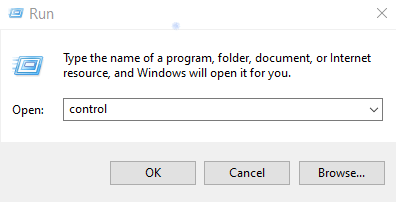
This is what will separate the “home user” and the “professional”. During my first few months I was painfully slow and inefficient. Learning my shortcuts and hotkeys made a huge difference in my workflow. Instead of navigating my way to the windows key, clicking it, typing run, and then pressing enter, you can simply hold down the Windows Key and press R simultaneously and this will accomplish the same command. On top of this hotkey, if you then have your shortcuts memorized you can simply type it in the Run Dialog box and jump directly to the desired window. For Example typing “control” will jump you straight to your control panel. Here is a nice article going over the Top 25 Run Commands.
https://geekflare.com/windows-run-commands/
Make sure to gain a solid grasp of the fundamentals.
When I was studying to get my Comp Tia A+ certification I didn’t realize just how much of it I would actually be using on a day to day basis. To my surprise, it was quite a lot. DHCP, DNS, IP Addressing, Printer types, RJ45 standards, Keystones, and a whole bunch more. These are the fundamentals of IT and will be the foundation that you will need to stand on when you begin troubleshooting and configuring. Just recently I received a call from a restaurant and the person said to me that her printer was not printing. I responded in the general way and asked if anything had changed recently. She informed me that they just changed out the paper. Bingo. I immediately asked her to change the paper roll to one from another working receipt printer, and, it started printing again.
The issue was the paper type. In restaurants, thermal printers are generally used for receipts, and kitchen printers are impact. The only reason I was able to come a conclusion so quickly is because of the understanding I have of thermal printer paper, versus impact paper. Even though it is the very basics, something simple will often be the solution.
Be humble.
Of all my previous tips listed above, this one is the most important. As you begin to develop a workflow it is easy to jump to conclusions or think you already have the solution. But I find that if I stop and listen to what someone has to say, I will usually learn something new. There are so many little nuances to computers, operating systems, and applications. The people around you can help teach you all kinds of tricks and quirks that you may have never thought of before. If you are not humble and listen you will end up struggling and wasting a lot of time trying to figure things out the hard way. Never judge someone’s knowledge especially if you are the new guy. Plus, nobody like a know-it-all.
 RainbothTech